 Connected
One shared source of truth
One operational record.
The same information, connected to the way oil & gas work happens.
- The work
- Remote work locations
- The record
- Contractor coordination
- The visibility
- Operational compliance
Axtara gives oil and gas contractors, service companies and operational teams one connected environment for managing workforce activity, projects, field records, compliance, costs and management reporting.

The work keeps moving. The information needs to move with it.
Work locations need a common operational picture.
Explore the use caseAn operations manager needs an overview of activity across remote sites and support bases before planning the next deployment.
Site updates and reviewed workforce records contribute to the same operational view across locations.
A clearer view across remote locations without collecting separate site updates.
Project VisibilityEmployee and contractor records need to stay connected to the work.
Explore the use caseA supervisor needs to see direct employees and contractor crews working on the same client assignment.
Employee and contractor assignments stay connected to the work location and the supervisor reviewing their activity.
One workforce picture across employees and contractors.
Workforce CoordinationAssignments change as projects and crews move.
Explore the use caseA coordinator needs to move a crew between client projects while keeping each assignment clear.
Assignment records connect each crew to the project, location and supervisor responsible for the work.
Clearer coordination as project requirements change.
Workforce CoordinationTime records need context and supervisor review.
Explore the use caseA remote-site supervisor needs to review shift hours and attendance exceptions before payroll preparation.
Time records carry their assignment context into supervisor review before approved hours contribute to payroll and cost reporting.
Reviewed time with the context needed to resolve questions.
Field-to-Office OperationsField updates need to reach the office consistently.
Explore the use caseA technician needs to submit a field update with photos from a client work location.
Field submissions reach the responsible supervisor for review and become part of the operational record.
Consistent field updates the office can follow in context.
Field-to-Office OperationsCertification status needs to be visible before deployment.
Explore the use caseA deployment coordinator needs to check crew certification status before assigning workers to a remote site.
Worker certification records sit alongside assignment information so teams can review readiness before deployment.
Earlier visibility of certification issues that need attention.
Compliance & Operational ControlExpenses need to stay linked to the work they support.
Explore the use caseA field supervisor submits a travel or supply expense against a client project.
The expense and supporting receipt follow a review process while remaining linked to the project they support.
Project expenses with a clear supporting record.
Cost & Financial VisibilityApproved activity needs to contribute to cost visibility.
Explore the use caseA project lead needs to understand how approved labor and expenses are affecting an active client contract.
Approved activity contributes to the project cost picture, with the underlying work records available for context.
Cost context while the work is still underway.
Cost & Financial VisibilityCurrent documents need to be available to the right people.
Explore the use caseA site supervisor needs the current work instructions and supporting documents for a client assignment.
Documents stay attached to the relevant project so field and office teams can find them in the context of the work.
Less time searching across email threads and shared folders.
Project VisibilitySubmitted records need a clear review process.
Explore the use caseA supervisor needs to review submitted time, field updates and expenses before they reach management reporting.
Submitted records move through review with a clear owner and remain connected to the operational activity they describe.
A clearer path from field submission to approved operational information.
Field-to-Office OperationsReviewed records need to reach leadership.
Explore the use caseAn operations leader needs a summary of workforce activity, project costs and compliance exceptions across client assignments.
Reviewed operational records contribute to management reporting across sites and projects.
A management view grounded in reviewed operational records.
Reporting & Executive IntelligenceAxtara gives oil and gas contractors, service companies and operational teams one connected environment for managing workforce activity, projects, field records, compliance, costs and management reporting.
01 / Capture the work
02 / Connect the record
ConnectedThe same information, connected to the way oil & gas work happens.
03 / See what matters
From the person recording the work to the people making the next decision.
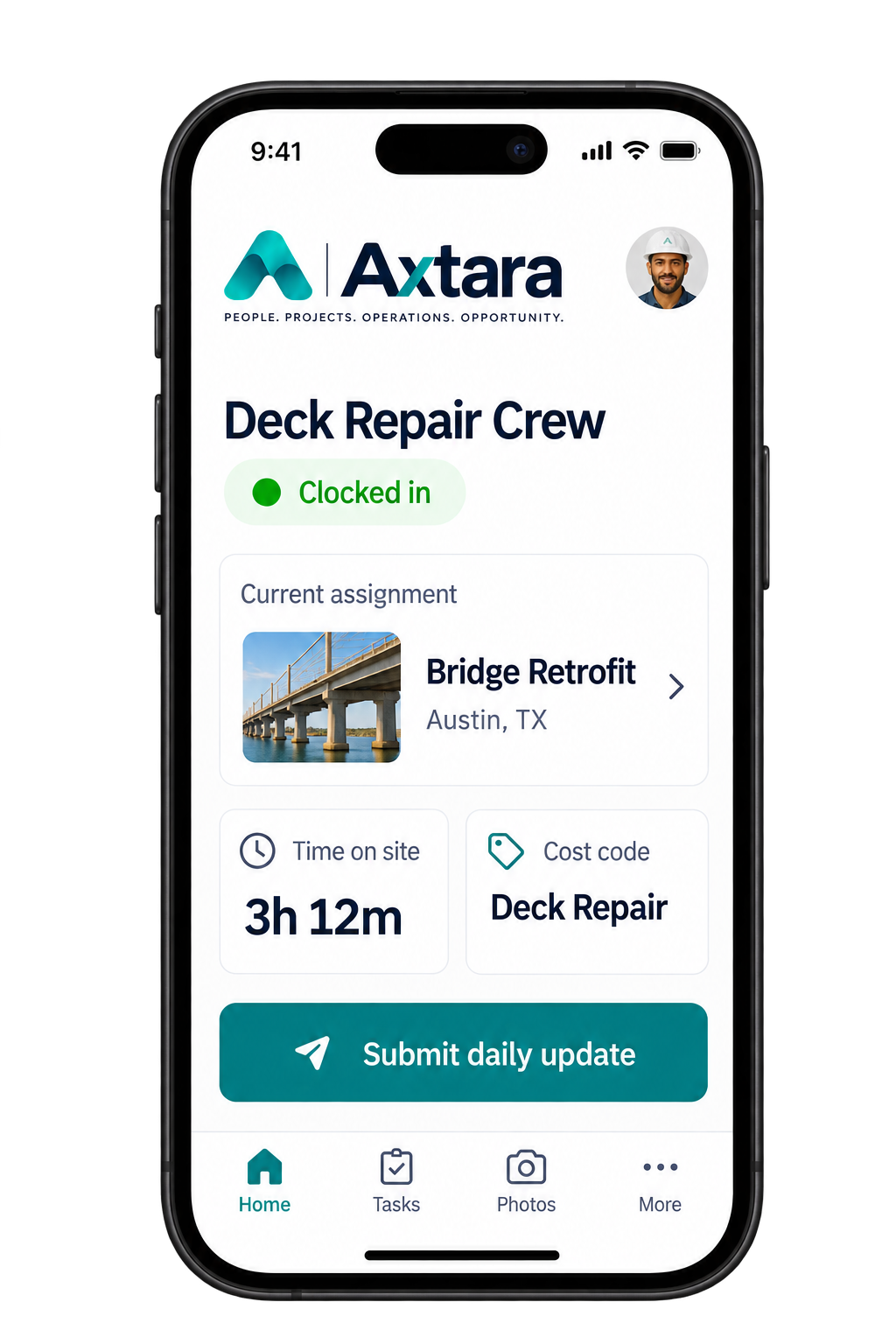
Time, assignments, daily updates and supporting evidence stay connected to the work on site.
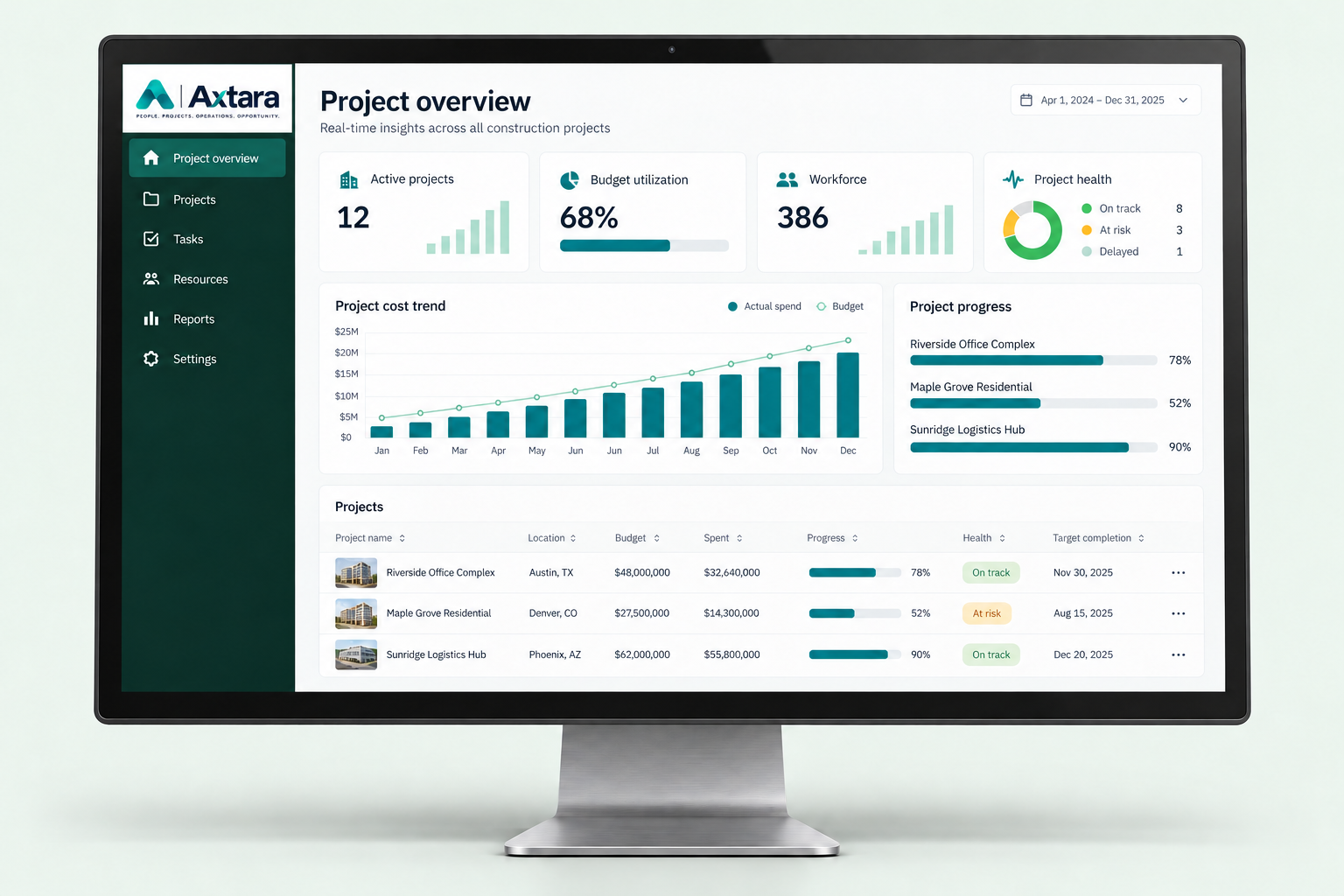
Axtara gives oil and gas contractors, service companies and operational teams one connected environment for managing workforce activity, projects, field records, compliance, costs and management reporting.
Captured in context. Reviewed by the right person. Visible to the teams that need it.
A worker or contractor arrives at an assigned work location.
Their field activity is associated with the correct project or operational assignment.
Time and attendance information enters the operational record.
Required certification or compliance information can be checked against the work context.
A field expense is submitted against the appropriate activity.
Supervisors review exceptions and submitted records.
Project and workforce information becomes visible to operational management.
Reviewed and approved information contributes to management reporting.
Everyone works from the same operational picture, with access that reflects their role.
Explore the platformReview field activity, attendance and submitted records with the work context.
Understand assignments, project status and operational exceptions across locations.
See reviewed activity across workforce, costs, compliance and reporting.
Axtara does not replace specialized upstream production, drilling or reservoir management systems.
Growing project environments can involve international operators, local contractors, service companies, distributed workforces, multiple project locations and increasing operational reporting requirements. Axtara provides a common operational layer that can help participating companies organize their own workforce, project and field information.
People, crews and assignments.
Explore solutionCaptured on site. Reviewed in context.
Explore solutionApproved activity, connected to cost.
Explore solutionProgress, costs and the project record.
Explore solutionReadiness, approvals and operational control.
Explore solutionThe operational picture leadership needs.
Explore solutionExplore how Axtara can connect your workforce, projects, field activity, costs, compliance and reporting in one operational environment.